The center runs on it. Tutors with their own logins and revenue splits, session packs that decrement on attendance across every tutor, the new-family pipeline that catches every inquiry, the Friday progress reports that pull from every session that week. Your data in the center’s own Google Workspace.

Sunday, 9 PM.
Session-pack balances are past due somewhere across the roster. You can’t tell who without messaging each tutor on a Sunday night and asking them to check their notebook. Two of them haven’t answered yet.
The welcome packet hasn’t been updated since the last hire. Center policies, the first-week schedule, the parent introduction script are still only in your head, scrawled on the back of last year’s lesson plan.
Every family expects a Friday-afternoon update. Right now that means three hours of pulling notes from six different notebooks, six tutors’ handwriting, and one shared Google Doc that’s out of date.
what you can do with one tap
Friday, 4:48 PM
A pile of graded papers on your desk. The weekend is right there. You snap a photo, tap Record grades, and the 28 marks land in the gradebook. The marked-up copies save to each student’s folder. The parents who asked for a heads-up get one in your voice. Close the laptop.
3:58, two minutes to class
You’re across the room signing a permission slip. One tap on the student who isn’t there. Or you tell your assistant “everyone but Bobby showed up.” Today’s attendance is in. Bobby’s family gets the auto-draft note in your voice.
Walk-in, Tuesday afternoon
A new family at the door, here to see the place. You tap Welcome packet. A branded packet with their name, your policies, and your rates lands in their email and in their Drive folder under a minute later. They sign and send it back the same evening.
what’s inside
Pro turns these four on by default. Add or drop any of them from settings whenever you want. The app updates in the background. No rebuild, no migration.
what your tutors actually open
The Sunday-night staff digest at the top, today’s sessions across every tutor, the three things that need an owner’s eye. That’s the screen.
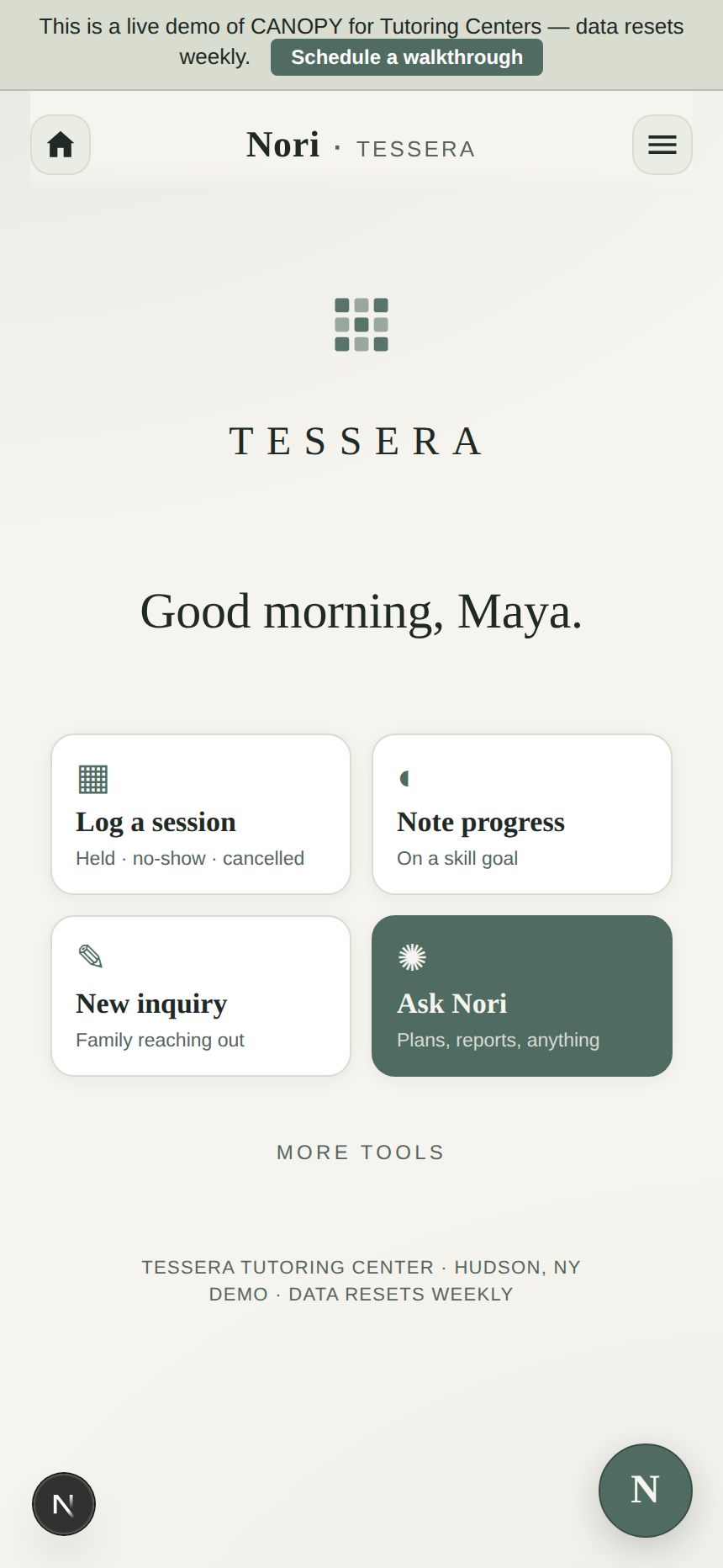
The center’s name centered at the top, a greeting that knows the time of day, and the four cards your tutors tap between sessions: log a session, note progress on a skill goal, take a new family inquiry, ask Nori. Everything else is one menu away.
Nori drafts the Sunday-night staff digest. She writes the welcome packet for the tutor who starts Tuesday. She stitches the Friday progress reports together from six tutors’ session notes, one update per family. She drafts the new-inquiry confirmation while you’re teaching the 5:00. You read, change a line, send.
Switch her off in settings and the center runs the same. Tutor rosters, tuition, session attendance, every core module keeps working. AI is one tab in this app, never a dependency.
She helps the days you want help. The other days, the center already runs.
a week at Tessera
Monday, 3:48 PM
The staff digest went out at 8 PM Sunday. The week’s sessions, the two new students this week, the parent who wants a meeting about her ninth grader. Every tutor opened it on their phone over coffee. Monday’s 4:00 sessions start on time.
Wednesday, 5:42 PM
The form on the website fires. The slot enters the pipeline at stage one. The parent gets the confirmation Nori drafted, with the intake form attached. Your phone shows a tile: “new inquiry: Algebra II, 9th grade, Tuesday/Thursday.” You read it at 6:30, not during the lesson.
Friday, 3:55 PM
Six tutors’ session notes pulled into one per-student update. The reports went out at four o’clock, one email per family, drawing from every session this week. You closed the laptop at 4:10. The thing you used to spend Friday night doing is the thing that already happened today.
how to get yours
No sales call. No demo schedule. The home screen, the staff digest, the Friday progress reports are all on this page already.
Look
The home screen, the Monday digest, the Wednesday inquiry tile, the Friday progress reports. That’s the actual app. Scroll back to anything you want a second look at.
Buy
Drop in the center’s name, your billing email, your card. Stripe handles the payment. Pro locks in. Cancel any time in month one.
Make it the center’s
Your app is already at your subdomain. The setup wizard walks you through picking the brand colors. About ten minutes from your end.
The app scales without scaling up. A three-tutor storefront and a multi-program center with test prep, reading support, and a college-prep track run the same app, more rows in the same tabs. Never a rebuild.
pricing
Pro turns on every module a tutoring center needs. Unlimited tutors, unlimited students. No per-seat counting, no enterprise call.
$699/mo · Pro
or $6,999 once to own.
Multi-tutor rosters with revenue splits per tutor. Session packs that decrement across every tutor a student sees. The new-family inquiry pipeline. Family and sibling discounts auto-applied. Nori on every tutor’s side tab.
Start the center’s CANOPY→Voices
“
Six tutors, one app. I stopped texting each one about how the week went.
a tutoring center director
“
Friday progress reports go out before I close the laptop. That used to be Friday night.
a center owner
“
New families book themselves in through the form. I just teach the trial.
a tutoring center director
questions
Will the app look like my center, or like CANOPY?
Your center’s name on the sign-in screen, your colors on the buttons, Nori renamed to whatever you call your assistant. The family who opens the portal to check a session time or a package balance sees your center. CANOPY is the rails. It doesn’t show.
How does it handle multiple tutors?
Each tutor signs in with magic-link. They see the students they work with, their schedule on their own Google Calendar, the materials they need. You see everything: their notes, their attendance, the families they support, the per-tutor revenue split.
A student sees two tutors. Do the parents get one report or two?
One. The Friday progress report draws from every session that student had during the week, across every tutor they see. The family portal shows one view per kid, not one per tutor. Parents get the whole picture without you stitching it together.
How do session packs work across tutors?
A family buys a 20-session pack at the center, not at a tutor. Any tutor they see decrements that one pack. Soonest-to-expire used first. When the balance hits two sessions, Nori emails the family with a one-tap renewal link.
How does the new-family inquiry pipeline work?
A parent fills out the inquiry form on the center’s website (or you log a phone call). The slot enters the pipeline at stage one. Nori drafts the confirmation, the intake form, the trial-session confirmation, and the follow-up after the trial. You read, change a line, send. The pipeline shows every inquiry across six stages: Inquiry, Questions Answered, Packet Sent, Trial Booked, Enrolled, Declined.
Where does the center’s data actually live?
In the center’s own Google Workspace. Student records are Sheets in your Drive. Tutor records are Sheets in your Drive. Session notes are Docs in your Drive. If you ever leave CANOPY, every spreadsheet stays in your account. We never see it. We never sell it. Anthropic doesn’t train Claude on it.

Do I have to use the AI?
No. Nori is one button in the corner. Open her when you want help on the staff digest or the Friday reports, close her when you don’t. The center runs the same with her off.
Can I add modules later?
Open the settings tab, tick the module you want. The app updates in a few minutes. Same for turning one off. No support ticket, no rebuild, no migration.
Is there a free trial?
No. There’s a free demo (Willowbrook). It runs the actual app with sample data. Use it as long as you need before you decide.
From a teacher, for center directors