One studio, one teacher, every tool. Private students, the Saturday workshop, the single drama program. Director’s notes instead of letter grades. Class packs that decrement on attendance. The showcase program built from the season you already logged. Your studio’s name on the door, your data in your own Google Workspace.

Sunday, late.
One of your privates is two weeks behind on her tuition. You meant to send the note Tuesday, and again Friday. It feels rude to be the one chasing it, so you closed the laptop both times.
She wants the piece you suggested for her son three weeks ago. You typed it into a text, somewhere. It’s between a photo of a script and a Saturday-morning thread about pickup. You can’t find it on a phone screen the way you could on a stage.
Six monologues, four scenes, twelve student bios. The cast list is on a sticky note inside your script. The Doc has been blank since the auditions wrapped two weeks ago. The print shop wants the file by Wednesday.
what you can do with one tap
Friday, 4:48 PM
A pile of graded papers on your desk. The weekend is right there. You snap a photo, tap Record grades, and the 28 marks land in the gradebook. The marked-up copies save to each student’s folder. The parents who asked for a heads-up get one in your voice. Close the laptop.
3:58, two minutes to class
You’re across the room signing a permission slip. One tap on the student who isn’t there. Or you tell your assistant “everyone but Bobby showed up.” Today’s attendance is in. Bobby’s family gets the auto-draft note in your voice.
Walk-in, Tuesday afternoon
A new family at the door, here to see the place. You tap Welcome packet. A branded packet with their name, your policies, and your rates lands in their email and in their Drive folder under a minute later. They sign and send it back the same evening.
what you actually use
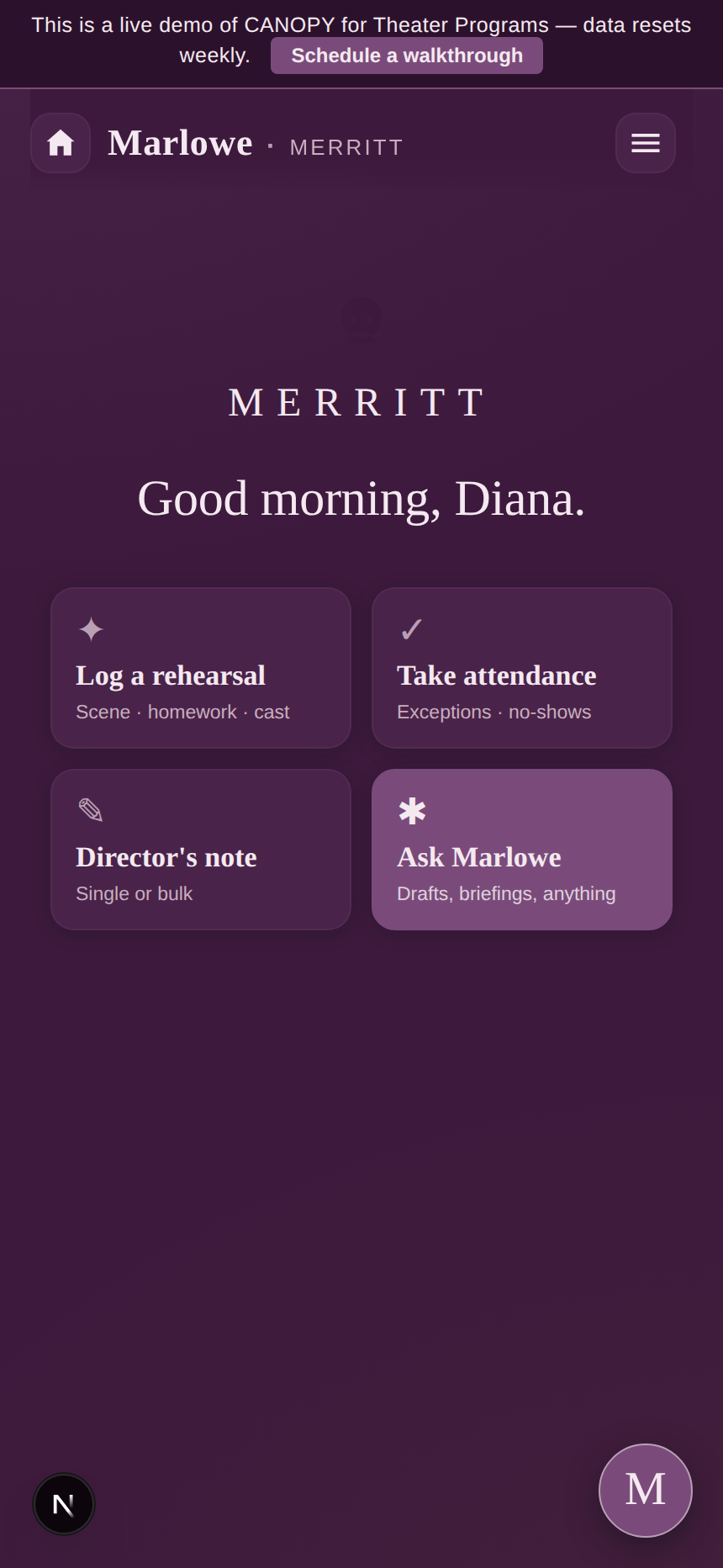
Time-aware greeting. Today’s sessions on the panel. Marlowe in a side tab. Four quick actions that match what a coach actually does first.
The studio’s name centered at the top, a greeting that knows the time of day, and the four cards you tap between scenes: log a rehearsal, take attendance, draft a director’s note, ask Marlowe. The data sits one tap down when you want it.
what’s inside
Add or drop any of these from the settings tab whenever you want. The app updates in the background. No rebuild, no migration.
a week at the studio
Tuesday, 3:48 PM
Last week’s director’s notes are on the screen. The monologue she’s working (Juliet’s balcony piece, cut for time) is right there. Her audition deadline next month is pinned to the top of her file. You poured the tea. That was your prep.
Saturday, 11:14 AM
Three families wanted the warm-up exercise you used in the morning workshop. One wanted the link to the audition you mentioned for college-prep students. Marlowe drafted the email in your voice, with the right attachments queued. You read it once over lunch, fixed one line, sent.
Sunday, 7:32 PM
Cast list, monologues, scenes, run times, every student’s bio, all in the productions module from the season you already logged. You exported the program, fixed two names that the auto-fill mangled, sent the PDF to the print shop. The laptop closed at 8 PM for once.
Marlowe drafts the family email you keep meaning to write. She writes the receipt the moment a tuition payment lands. She quotes your studio’s own policies, because you wrote them in the Knowledge Base once and she reads them back the same way every time. She drafts the showcase program copy from your cast list.
Switch her off in settings and the studio runs the same. Sessions, attendance, tuition, the showcase, every core module keeps working. AI is one tab in this app, never a dependency.
She helps the days you want help. The other days, the app already does the work.
what it actually does
Plain capabilities. The ones in the box on day one.
Every student has a profile with a family contact, a Drive folder of their own, and a rehearsal attendance log. Mark a session held with one tap. Absences feed your follow-up list automatically.
Invoices, payments, family balances, overdue tracking. Class packs let a family pre-pay a ten-session bundle. Credits decrement when you mark a session held. Soonest-to-expire used first.
Email drafts to one family or your whole list, branded with your studio’s name and colors. Every email logged. Marlowe drafts, you read and send. No scheduled sends or automation rules today.
Feedback recorded as notes against a scene, a monologue, or a run-through. The theater idiom, not letter grades. Per-student history, per-piece review, the whole season at a glance.
Cast roster per show, scene order, run times, per-student fee tracking. The module produces a program data view you can hand to the printer.
Templates with placeholders (student name, family contact, attendance summary, recent director’s notes) fill from your data and save to the student’s Drive folder as a Doc and a PDF.
how to get yours
No sales call. No demo schedule. The home screen, the Tuesday session, the Sunday showcase program are all on this page already.
Look
The screens above are the actual app. Scroll back to the home screen, the Saturday workshop follow-up, or the Sunday showcase moment for a second look.
Buy
Drop in your studio’s name, your billing email, your card. Stripe handles the payment. Cancel any time in month one.
Make it yours
Your app is already at your subdomain. The setup wizard walks you through picking the brand colors. About ten minutes from your end.
The app scales with you, not into something else. A handful of private students today, a Saturday workshop tomorrow, a full company someday. Same app, more rows in the same tabs. No rebuild.
pricing
No size matrix. If the studio is you, this is the one.
$169/mo · Solo
or $699 once to own.
One teacher, every core tool on. The full operating backbone for a working coach, a Saturday workshop, or a single drama program.
Start your studio’s CANOPY→If you lead a team of teachers (an assistant director, a music director, a co-teacher or two), CANOPY Pro for theater programs is the one for you. $699/mo, or $6,999 once to own. Production staff and family portal on by default.
Voices
“
I can tell a parent exactly which monologue we’re working on this month.
a private acting coach
“
The Saturday workshop runs without me writing six follow-up emails on Friday night.
a drama teacher
“
Tuition stopped being the thing I dread sending a reminder about.
a teaching artist
questions
I coach private students out of a small studio. Does it fit one teacher with twenty kids?
Yes. That is exactly who this edition is for. One teacher, one calendar, one tuition ledger, one director’s-notes thread per student. Nothing built around departments or staff rosters until you choose to add them.
We give director’s notes, not letter grades. Does the app handle that?
Yes. Feedback is recorded as notes against a scene, a monologue, or a run-through, the way a director actually works. No letter grades or percentages unless you want to add them yourself in the gradebook.
My students audition outside the studio. Can the app track their pieces and deadlines?
Yes. Each student has notes, documents, and tasks that travel with them. Pin the monologue, file the headshot in their Drive folder, set the audition date as a task. It’s your own working file, not a school’s record system.
Showcases and a printed program, does the app handle that for one teacher?
Yes. The Productions module tracks a cast list, scene order, run times, and per-student fees. It produces the program data you hand to the printer.
Where does my data actually live?
In your own Google Workspace. Student profiles are Sheets in your Drive. Director’s notes are Docs in your Drive. Showcase programs are PDFs in folders you own. If you ever leave CANOPY, you keep all of it. We don’t see it, we don’t sell it, Anthropic doesn’t train Claude on it.
Do I have to use the AI?
No. Marlowe is one button in the corner. Open her when you want help drafting a workshop follow-up or the showcase program copy, close her when you don’t. The studio runs the same with her off.
Is there a free trial?
No. There’s a free demo (Willowbrook). It runs the actual app with sample data. Use it as long as you need before you decide.
One teacher. One studio. One app.