CANOPY for the academy

CANOPY for the art academy.

The whole academy runs on it: teaching artists with their own logins and revenue splits, an admissions pipeline that catches every inquiry, exhibitions across every class, the family portal parents have been asking for. Your academy’s name on the door. Your data in the academy’s own Google Workspace.

A small arts academy at dusk. A brick building with tall studio windows lit warm from within, lavender garden beds along the path, the sky deep plum behind.

Sunday, 9 PM.

You opened the academy because you love the work. The admin took your nights.

Three families behind, somewhere across eight classes.

Tuition is a month past due. You can’t tell who without messaging each teaching artist on a Sunday night to ask which of their families are caught up. Two of them haven’t answered yet.

A new teaching artist starts Tuesday morning.

The welcome packet hasn’t been updated since the last hire eighteen months ago. The studio policies, the first-week schedule, the parent-introduction email are still only in your head.

Spring Exhibition opens in five weeks. No wall labels.

Eight classes are contributing pieces. Nobody has drafted the running order. Two adult learners haven’t told their instructors what they’re submitting, and the studio guest list for the opening still lives on a sticky note.

what you can do with one tap

What one tap does.

Friday, 4:48 PM

A photo of the stack becomes 28 grades.

A pile of graded papers on your desk. The weekend is right there. You snap a photo, tap Record grades, and the 28 marks land in the gradebook. The marked-up copies save to each student’s folder. The parents who asked for a heads-up get one in your voice. Close the laptop.

3:58, two minutes to class

You mark the one who isn’t there. The room is logged.

You’re across the room signing a permission slip. One tap on the student who isn’t there. Or you tell your assistant “everyone but Bobby showed up.” Today’s attendance is in. Bobby’s family gets the auto-draft note in your voice.

Walk-in, Tuesday afternoon

Their welcome packet is ready before they leave.

A new family at the door, here to see the place. You tap Welcome packet. A branded packet with their name, your policies, and your rates lands in their email and in their Drive folder under a minute later. They sign and send it back the same evening.

what’s inside

Twelve tools every CANOPY ships with, plus five for an academy with faculty.

What every CANOPY academy gets

  • Students and family contacts (adults included)
  • Schedule on shared Google Calendars
  • Family communications across every class
  • Documents (intake, invoices, programs, wall labels)
  • Tuition: invoices across families and classes
  • Studio attendance and cancellations
  • Portfolio: project entries, skill marks, critique notes
  • Studio practice: sessions, projects, studio series
  • Year-in-review reports, portfolio summaries
  • Tasks and reminders for every teaching artist
  • Academy knowledge base (policies, exhibition calendar)
  • Academy branding, plus Blossom as the academy’s assistant

The five built for arts academies

  • Teaching artist rosters with revenue split per artist
  • Family portal with magic-link sign-in
  • Admissions inquiry pipeline through six stages
  • Exhibitions: rosters across classes, wall labels, programs
  • Studio cards (session packs, auto-decrement, expirations)

Pro turns these five on by default. Add or drop any of them from settings whenever you want. The app updates in the background. No rebuild, no migration.

what your faculty actually opens

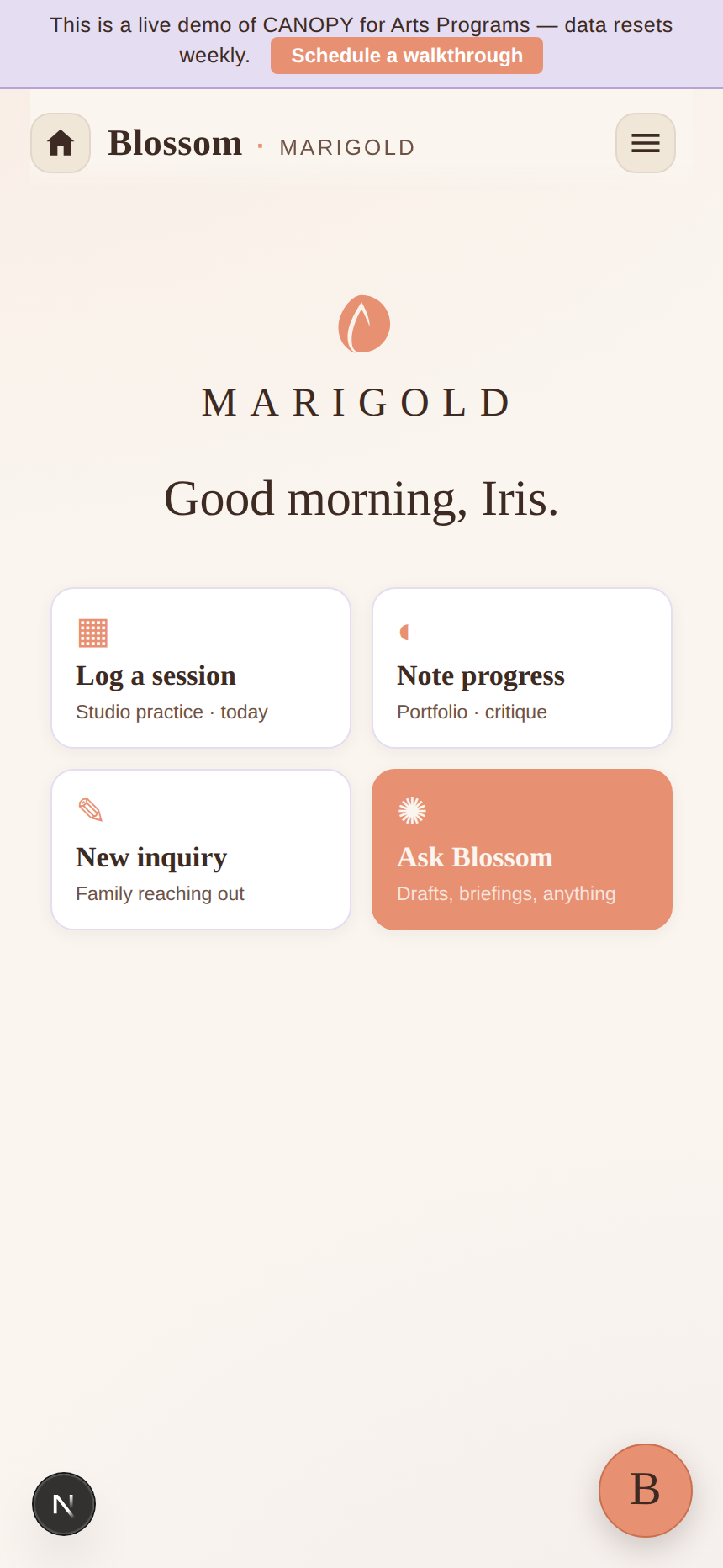
The academy’s home screen, the morning before classes.

The faculty digest Blossom drafted on Sunday night, today’s sessions across every teaching artist, the three things that need a director’s eye. That’s the screen.

The Marigold Studio home screen on a phone. The studio name centered at the top, the greeting ‘Good morning, Iris,’ and four quick-action cards: log a session, note progress, new inquiry, ask Blossom.

It opens to the four things you reach for first.

The academy’s name centered at the top, a greeting that knows the time of day, and the four cards your faculty taps before sessions begin: log a session, note portfolio progress, take a new family inquiry, ask Blossom. Everything else is one menu away.

  • The academy’s name on every family-facing screen, your colors throughout
  • Blossom in a side tab. Open her when you need her, ignore her when you don’t.
  • Faculty, families, admissions, exhibitions: each one menu away
Optional AI

Blossom for the academy, if you want her.

Blossom drafts the Sunday-night faculty digest. She writes the welcome packet for the teaching artist who starts on Tuesday. She drafts the trial-class confirmation while you’re critiquing the 4:00. She builds the wall labels for Spring Exhibition from every class’s portfolio entries. You read, change a line if you want, send.

Switch her off in settings and the academy runs the same. Faculty rosters, tuition across classes, attendance, portfolio entries, every core module keeps working. AI is one tab in this app, never a dependency.

She helps the days you want help. The other days, the academy already runs.

A wooden critique table at the end of the day. Small canvases laid out, two notebooks open, paint swatches, two coffee mugs, soft window light.

a week at Marigold Arts Academy

Three moments from a real academy week.

A long wooden faculty planning table with an open binder, colored pencils, and lesson outlines, in a quiet studio with morning light through tall windows.

Monday, 9:18 AM

Every teaching artist walks in already briefed.

The faculty digest went out at 8 PM Sunday. The week’s schedule, the two new students who started this week, the parent who wants a meeting with the ceramics instructor. Every teaching artist opened it on their phone over coffee. Mondays start with teaching, not triage.

Wednesday, 2:46 PM

An admissions inquiry lands during the 2:30 critique.

The form on the academy’s website fires. The slot enters the pipeline at stage one. The parent gets the confirmation Blossom drafted, with the what-to-bring document attached. Your phone shows a tile: “new inquiry, watercolor, age 11.” You read it between students, not during.

A wood-floored hallway in an arts academy with three open studio doorways. Easels in one, pottery wheels in another, life-drawing chairs in the third.
An evening gallery wall of framed student artwork with small cream label cards, warm spotlights, a wooden guest-book pedestal in the foreground.

Friday, 6:20 PM

The exhibition is already on the walls.

Eight classes’ work hung by morning. Blossom drafted the wall cards from each student’s portfolio. The running order came from the exhibition module’s roster, ordered by medium. Family invites went out on Tuesday with one tap. Tonight the doors open and you’re in the room, not at a laptop.

how to get yours

You’re looking at the academy’s demo on this page.

No sales call. No demo schedule. The faculty digest, the admissions pipeline, the Spring Exhibition flow are all on this page.

Look

You’ve been doing it since you scrolled in.

The home screen, the Monday faculty digest, the Wednesday admissions tile, the Friday exhibition. That’s the actual app. Scroll back to anything you want a second look at.

Buy

Checkout takes about two minutes.

Drop in the academy’s name, your billing email, your card. Stripe handles the payment. Pro locks in. Cancel any time in month one.

Make it the academy’s

Set it up in about ten minutes.

Your app is already at your subdomain. The setup wizard walks you through picking the brand colors. About ten minutes from your end.

The app scales without scaling up. A three-instructor studio and a twelve-class academy with admin staff run the same app, more rows in the same tabs. Never a rebuild.

pricing

One price for the art academy.

Pro turns on every module an arts academy needs. Unlimited teaching artists, unlimited students. No per-seat counting, no enterprise call.

$699/mo · Pro

or $6,999 once to own.

Teaching artist rosters with revenue splits per artist. Full admissions pipeline. Exhibitions across every class. The family portal parents have been asking for. Blossom on every faculty member’s side tab.

Start the academy’s CANOPY

Includes

  • The 12 core modules and Blossom
  • Teaching artist rosters with per-artist revenue splits
  • Admissions inquiry pipeline (six stages)
  • Exhibitions across every class: rosters, labels, programs
  • Studio cards with auto-decrement and renewal emails
  • Family portal, magic-link sign-in
  • Unlimited teaching artists, unlimited students

Voices

What academy directors have said back.

Three teaching artists, one app. I stopped texting each one for an update.

a studio director

The welcome packet writes itself for every new hire. I haven’t redone it in seven months.

an arts academy director

Parents see their kid’s portfolio without me forwarding photos from my phone.

a studio director

questions

What academy directors ask before they buy.

Will the app look like my academy, or like CANOPY?

Your academy’s name on the sign-in screen, your colors on the buttons, Blossom renamed to whatever you call your assistant. The family who opens the portal to see their kid’s portfolio sees your academy. CANOPY is the rails. It doesn’t show.

How does it handle multiple teaching artists?

Each artist signs in with magic-link. They see the classes they teach, the students in those classes, their schedule on their own Google Calendar, the materials they need. You see everything: their schedules, their critique notes, the families they work with, the per-artist revenue share.

Parents want their kid’s progress across two instructors’ classes. Can the app do that?

Yes. The family portal shows one view per student, drawing from every class the student is enrolled in. A parent of a Wednesday-Friday kid sees both instructors’ critique notes and both classes’ portfolios in one place. Updates pull from your Sheets in seconds.

How does the admissions inquiry pipeline work?

A parent fills out the inquiry form on the academy’s website (or you log a phone call). The slot enters the pipeline at stage one. Blossom drafts the confirmation, the what-to-bring, and the follow-up after the trial class. You read, edit one line, send. The pipeline shows every inquiry: Inquiry, Questions Answered, Packet Sent, Trial Booked, Enrolled, Declined.

Where does the academy’s data actually live?

In the academy’s own Google Workspace. Student profiles are Sheets in your Drive. Teaching-artist records are Sheets in your Drive. Portfolio images live in folders you own. Exhibition programs are PDFs in folders you own. If you ever leave CANOPY, every spreadsheet stays in your account. We never see it. We never sell it. Anthropic does not train Claude on it.

Do I have to use the AI?

No. Blossom is one button in the corner. Open her when you want help on the faculty digest, close her when you don’t. The academy runs the same with her off: faculty rosters, scheduling, tuition, attendance, portfolios.

Can I add modules later?

Open the settings tab, tick the module you want. The app updates in a few minutes. Same for turning one off. No support ticket, no rebuild, no data migration.

Is there a free trial?

No. There’s a free demo (Willowbrook). It runs the actual app with sample data. Use it as long as you need before you decide.

From a teacher, for art academies

Run the academy on what you wish you’d had.